Local Pack vs Google Maps: What to Track (and Why Your Rankings Don’t Match)
If you’ve ever searched your main keyword and thought, “Wait… why are we #1 in Google Maps but not showing in the Local Pack?”—you’re not imagining it. The Local Pack and Google Maps can rank businesses differently for the same query because they’re built for different user intent and can weight local signals differently.
This guide explains local pack vs google maps and gives you a clear checklist of what to track so your reporting matches what real customers see.
Local Pack vs Google Maps: What’s the difference?
What is the Google Local Pack?
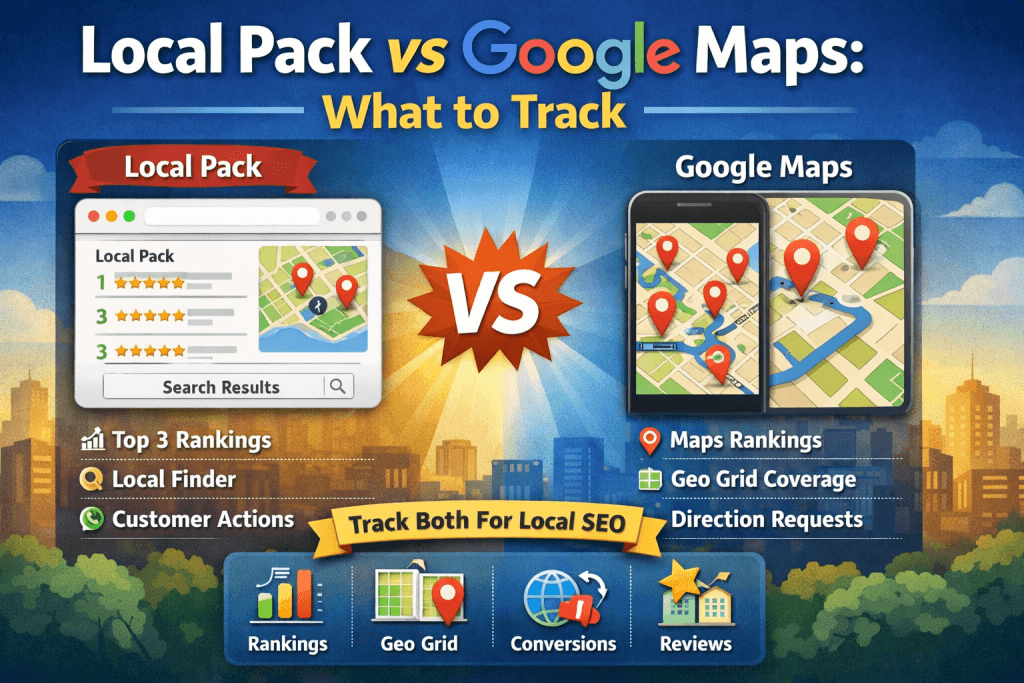
The Local Pack (sometimes called the “Map Pack” or “3-Pack”) appears in Google Search and shows a map with a short list of local businesses. It’s designed for discovery—helping searchers compare options quickly.
What is Google Maps?
Google Maps is the standalone Maps experience (in the Maps app or on maps.google.com). People use it for navigation—to evaluate options nearby, read reviews, and get directions.
Where Local Finder fits in
When someone clicks “More places” from the Local Pack, they typically enter Local Finder (expanded results). Local Finder is connected to the Local Pack experience, but it’s not identical to Google Maps—and rankings can differ there too.
Why Local Pack rankings can differ from Google Maps rankings
A simple way to think about it:
- Google Maps = navigation intent (the user wants to go somewhere; proximity often matters more)
- Local Pack = discovery intent (the user is comparing options; relevance and prominence can outweigh pure proximity)
Google generally describes local visibility using three core factors:
- Proximity — how close the searcher is to the business
- Relevance — how well the listing matches the query
- Prominence — how established and trusted the business appears online
Because intent and weighting can differ between surfaces, it’s common to see mismatched rankings across the Local Pack, Local Finder, and Google Maps.
The most important rule: Track Local Pack and Google Maps separately
If you only track one surface, you can end up with “false good news.” You might look great in Maps (especially near your address) but underperform in the Local Pack where competition and prominence often decide the top three.
Visiclix recommendation: track and report Local Pack + Local Finder + Google Maps side-by-side for the same keyword set.
What to track: Local Pack vs Google Maps KPI checklist
1) Visibility KPIs (rankings + coverage)
Track these separately for each primary keyword:
- Local Pack rank (Top 3 visibility + where you sit beyond the pack)
- Google Maps rank
- Local Finder position (after clicking “More places”)
Also track coverage (not just one “vanity rank”):
- Geo-grid visibility (share of area) — where you rank across your city/service area vs only at your address
- Top 3 share — how often you appear in the Local Pack across the grid
- Top 10/20 share — how often you appear in Maps/Local Finder across the grid
Why it matters: local results vary by user location. A single search from one device is not a reliable KPI.
2) Conversion KPIs (what people do after they see you)
Rankings don’t pay the bills—actions do. Track Google Business Profile (GBP) performance and validate with GA4 where possible:
- Calls
- Website clicks
- Direction requests
- Messages (if enabled)
- Appointment link clicks (if used)
Tip: add UTM tags to your GBP website link and appointment link so GA4 can attribute traffic correctly.
3) Prominence KPIs (authority signals that help you “jump distance”)
If Maps rankings look decent but the Local Pack is weak, you usually have a prominence gap. Track:
- Review count (total + net new per month)
- Average rating
- Review velocity (consistency matters)
- Review themes (do reviews mention priority services?)
- Citation consistency (NAP accuracy + core directories)
- Local backlinks / mentions (chambers, local news, sponsorships, partnerships)
Benchmark competitors: compare your review velocity and rating to the current top 3 for your main keywords.
4) Relevance KPIs (are you the best match for the query?)
Inside Google Business Profile, track:
- Primary + secondary categories
- Services/products completed (where applicable)
- Business description aligned with real services (avoid keyword stuffing)
- Photos (quantity + freshness)
- Posts (frequency)
- Q&A coverage
- Attributes (payments, accessibility, etc.)
On the website, track:
- Service + location pages (one per major service/area as appropriate)
- Title tags and headings aligned with local intent
- Consistent NAP (name, address, phone)
- LocalBusiness schema (where appropriate)
5) Proximity KPIs (measure your visibility radius)
You can’t “SEO” your way out of distance, but you can measure where proximity begins to limit you.
- Local Pack drop-off point (where you stop appearing Top 3 on the grid)
- Maps/Local Finder drop-off point (where you fall out of Top 10/20)
- Radius trend month-over-month (are you expanding coverage?)
6) Mismatch alerts (fast diagnostics)
Use these rules to diagnose what to fix first:
- If Maps is strong but Local Pack is weak: prioritize prominence (reviews, links/mentions, authority signals).
- If Local Pack is strong even far away: your relevance/prominence is strong—defend your moat and keep review velocity consistent.
A simple monthly reporting framework (client-friendly)
Page 1: Outcomes
- Calls, website clicks, direction requests (GBP)
- Appointments/leads (GA4/CRM)
Page 2: Visibility
- Local Pack rankings (primary keywords)
- Google Maps rankings (same keywords)
- Geo-grid coverage snapshot
Page 3: Why it moved
- Reviews gained + rating change
- GBP activity (posts/photos)
- Citation/NAP fixes completed
- Website/local content shipped
Page 4: Competitor benchmark
- Review velocity vs top competitors
- Category/service gaps
- Who entered/exited the Local Pack
FAQ: Local Pack vs Google Maps
Is the Local Pack the same as Google Maps?
No. The Local Pack appears in Google Search and shows a short list of businesses. Google Maps is a separate interface where users browse results on a map. They can rank differently.
What happens when you click “More places”?
You enter Local Finder (expanded results). Local Finder is related to the Local Pack but isn’t identical to Google Maps.
Which should I report to clients—Local Pack or Maps?
Both. Reporting only one can misrepresent what customers actually see in Search and Maps.
Ready to track this properly?
If you want Visiclix to set up Local Pack + Maps tracking, geo-grid reporting, and conversion measurement through Google Business Profile and GA4, we can help you build a clean KPI dashboard that’s easy to understand—and easy to prove.