If you manage a healthcare practice, you already know the hard part isn’t getting reviews—it’s handling them consistently, quickly, and safely without turning your front desk into a customer support center.
The simplest approach that actually holds up in real life is a single workflow that covers both Healthgrades and Facebook Recommendations/Reviews, with clear ownership, triage rules, HIPAA-safe response patterns, and a monthly “learn and fix” loop.
What is Healthgrades reviews management—and what “good” looks like in healthcare?
Healthgrades reviews management is the repeatable process of monitoring, triaging, responding, and learning from patient feedback on Healthgrades—without compromising privacy, professionalism, or operational sanity.
“Good” looks like this:
- Reviews are seen quickly (nothing sits for weeks).
- Every review is categorized (topic + severity) so the right person handles it.
- Responses follow HIPAA-safe guardrails (no patient confirmation, no specifics).
- Policy-violating content is flagged properly, with realistic expectations about outcomes.
- Feedback drives small operational improvements (scheduling, wait-time communication, billing clarity, staff scripting).
Healthgrades explicitly relies on community review guidelines and allows reviews to be flagged for additional review, but Healthgrades makes the final decision about removal.
Why do Healthgrades and Facebook reviews need a single workflow instead of separate routines?
Because patients don’t experience your practice in platform silos.
Healthgrades often catches people in a high-intent moment: comparing providers, checking credibility signals, deciding whether to call. Facebook reviews are more social—easier to share, easier to comment on, and more likely to become a thread.
If you manage them separately, you typically get predictable problems: mismatched tone (“clinical” on one platform, reactive on the other), missed reviews, inconsistent response speed, and the biggest risk of all—someone tries to “explain what happened” publicly.
A single workflow reduces all of that. It gives your team one set of rules and one cadence they can follow even during busy weeks.
What is the end-to-end workflow for managing Healthgrades + Facebook reviews from alert to resolution?
Here’s the simplest workflow that works for busy practices—the 7-step loop:
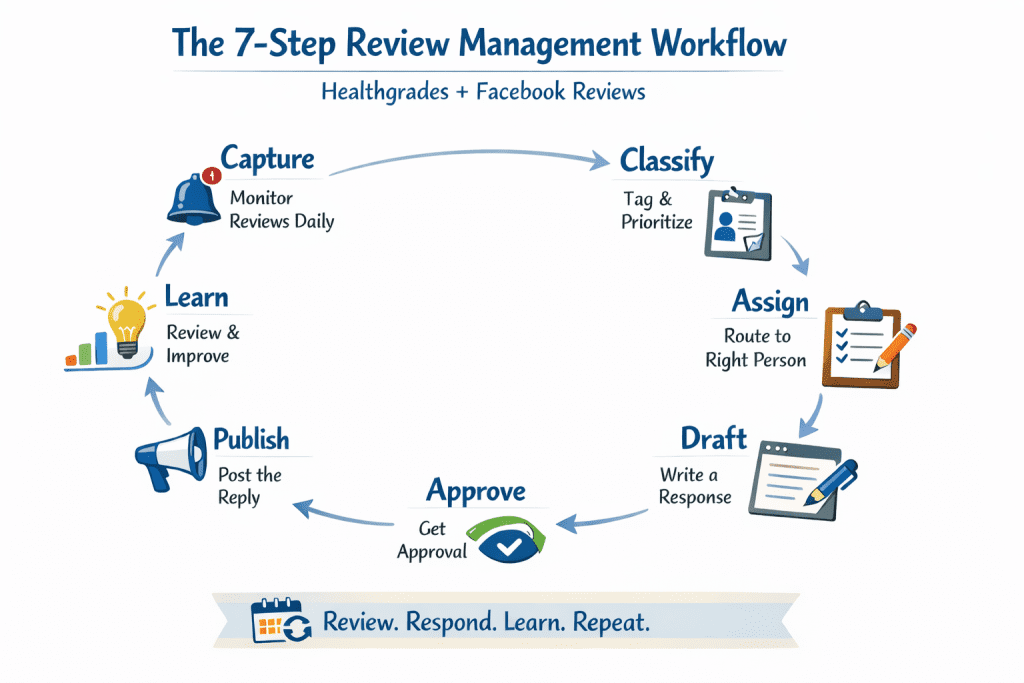
You don’t need a 17-step reputation playbook. You need a short loop that repeats the same way every week.
A practical system looks like this:
- Capture (daily, light touch).
One designated owner checks Healthgrades and Facebook daily—or routes notifications into a shared inbox (or Slack channel) that the owner monitors. The goal isn’t instant replies; it’s making sure nothing gets lost. - Classify (fast and consistent).
Each review gets a topic tag (wait time, scheduling, billing, staff, facility, clinical allegation, spam/wrong practice) and a simple risk label (low/medium/high). This prevents the most common operational failure: treating every negative review like it needs the same type of response. - Assign (same day when possible).
Most reviews do not belong to the front desk by default. Service feedback might, but billing complaints often need the billing lead, and anything high-risk should route to the practice manager or privacy lead. - Draft (especially for negatives).
Draft quickly, using a template plus a sentence of human personalization—without adding patient details. The goal is not to “win the argument.” It’s to show professionalism and move the situation offline. - Approve (only for high-risk).
High-risk reviews get a quick second set of eyes before posting. This one step prevents nearly every public-response mistake healthcare teams make. - Publish (within a reasonable SLA).
Negatives get prioritized. Positives can wait a few days. Consistency matters more than perfection. - Learn (monthly).
Once a month, pull themes and pick one fix that will prevent repeats next month. If you skip this step, you’ll live in a permanent cycle of “apologize, repeat, apologize again.”
Who should own reviews management in a practice—and how do you set backup coverage?
Ownership should sit with someone who can coordinate across teams and isn’t trapped in constant patient-facing throughput. In many practices, that’s the practice manager or office manager; in some, it’s a patient experience lead or marketing coordinator with operational access.
Backup matters more than most teams expect. Reviews don’t pause for vacations or sick days—and a delayed response to a serious allegation can create unnecessary reputational drag.
A simple model that works:
- Primary owner: practice manager / patient experience lead
- Backup owner: front office lead (trained on guardrails)
- Escalation owner: privacy officer / administrator (and counsel contact for rare situations)
If you’re multi-provider, it helps to have a “provider champion” available internally—not to reply publicly with details, but to help you understand whether an issue hints at a real process breakdown that needs attention.
How do you set up monitoring so no Healthgrades or Facebook review is missed?
Healthgrades
- Use Healthgrades’ provider tools/help resources so you can view and manage reviews. Claiming/using a Healthgrades profile is presented as a way to update info and respond to patient reviews.
- Make sure Recommendations are enabled if you want them displayed; Facebook notes only Pages that turn on recommendations may show a rating.
- Use Meta’s management tools (e.g., Meta Business Suite) to centralize Page activity and access control.
Simple “single source of truth”
Keep a lightweight review log (sheet or CRM note) with:
- platform + link
- date posted
- topic tag(s)
- risk level
- status (new/drafting/posted/offline in progress/flagged)
- owner
That one log is the difference between “we think we replied” and “we can prove the workflow ran.”
How do you triage reviews quickly without misclassifying something high-risk?
Use a two-layer triage:
Layer 1: Topic
- Scheduling / wait time
- Staff experience
- Billing / insurance
- Facility
- Clinical quality allegation
- Spam / misinformation / wrong practice
Layer 2: Risk flags (automatic escalation)
Escalate to manager/privacy lead if the review includes:
- threats or harassment
- claims of discrimination
- safety allegations (“harm,” “malpractice,” “infection,” etc.)
- demands for records
- legal threats
- identifying details about staff or other patients
You’re not escalating because you want to “fight back.” You’re escalating because HIPAA-safe language limits what you can say publicly, even if the reviewer overshares.
How should you respond to Healthgrades reviews in a HIPAA-safe way?
Yes, you can respond—but the safest rule is:
Never confirm the person is a patient. Never discuss specifics of care.
The AMA notes that acknowledging a patient relationship can risk violating privacy protections, and that while responding isn’t explicitly prohibited, physicians must not disclose patient-specific information—even if the patient reveals it first.
A HIPAA-safe response structure (works for most situations)
- Thank/acknowledge
- General commitment statement
- Invite offline conversation
- Provide a contact path (phone/email or “please call our office”)
HIPAA-safe examples (Healthgrades)
5-star
Thank you for taking the time to share your experience. We’re committed to providing a welcoming, respectful environment for everyone we serve.
Wait time
Thank you for your feedback. We’re always working to improve scheduling flow and communication. If you’re willing, please contact our office so we can learn more and address your concern directly.
Strong negative
We’re sorry to hear you felt disappointed. We take feedback seriously and want to learn more in a private setting. Please contact our office so we can review your concerns.
Notice what’s missing: dates, procedures, outcomes, “we remember you,” or any hint that confirms identity.
How should Facebook review responses differ from Healthgrades responses?
Facebook is more conversational and more public-facing—your response can be seen, shared, and commented on.
Key differences:
- Keep replies shorter (Facebook threads can spiral).
- Move to offline or private conversation earlier.
- Watch for pile-ons; avoid back-and-forth debates.
Also, remember: Facebook Page ratings are tied to recommendations/reviews and require recommendations enabled for a rating to appear.
And Meta’s Community Standards govern what content can remain on the platform (e.g., harassment, harmful content categories).
Facebook example reply
Thanks for sharing this feedback. We’re sorry to hear that. Please message us directly or call the office so we can understand what happened and help.
What response templates should you keep ready for Healthgrades and Facebook (without sounding robotic)?
Keep a small template library (6–10 templates). The trick is not writing 50 templates—it’s applying personalization rules:
Personalize only 1–2 lines:
- “Thank you for taking the time…”
- “We appreciate you calling out our front desk team…”
- “We’re always working to improve wait-time communication…”
…and nothing patient-specific.
Template pack (copy-ready)
Template 1: 5-star
Thank you for your kind words. We’re grateful you took the time to share your experience. Our team works hard to provide respectful, high-quality care and service.
Template 2: 3-star “mixed”
Thank you for the feedback. We’re glad to hear what went well, and we’re also taking your concerns seriously. If you’re willing, please contact our office so we can learn more and improve.
Template 3: Wait time
Thanks for sharing this. We’re always working to improve scheduling flow and communication. Please contact our office so we can better understand what happened and address it directly.
Template 4: Staff attitude
We’re sorry to hear this was your experience. Courtesy and respect are non-negotiable for us. Please contact our office so we can learn more and follow up internally.
Template 5: Billing
Thank you for raising this concern. Billing and insurance questions can be complex and we’d like to help in a private setting. Please contact our billing team through the office so we can review the issue.
Template 6: “Not a patient / wrong office”
Thanks for the note. We want to make sure feedback reaches the right place. Please contact our office so we can confirm details and help direct your concern appropriately.
When should a provider respond personally—and what approval rules prevent mistakes?
Provider responses should be rare and reserved for:
- serious allegations that could impact trust broadly,
- high-visibility situations (shared widely),
- or where a provider-level reassurance helps.
Even then, the response must still stay general. The AMA emphasizes avoiding patient-specific disclosures and even acknowledging the relationship can be risky.
Approval rules that prevent mistakes:
- High-risk reviews require manager/privacy approval.
- No responses drafted “in anger.”
- No clinical explanations.
- No “we did everything right” arguments.
If you need to correct misinformation, do it without specifics:
We can’t discuss details in a public forum, but we take concerns seriously and encourage you to contact our office so we can review and help.
How do you handle fake, malicious, or policy-violating reviews on Healthgrades and Facebook?
Step 1: Document first
- Screenshot + link + date + reason you believe it violates policy
- Keep internal notes private (don’t post them publicly)
Step 2: Use platform processes
Healthgrades
- Healthgrades has Community Review Guidelines and allows reviews to be flagged for additional review.
- Healthgrades’ help documentation explains you can flag a review for audit if it violates editorial policy, but Healthgrades decides whether it’s removed.
- Report content that violates rules; Meta’s Community Standards outline what is and isn’t allowed.
Step 3: If it stays up, respond for the next patient
Your response isn’t for the reviewer—it’s for everyone reading.
A good “for the audience” reply:
We take feedback seriously and want to help, but we can’t discuss details publicly. Please contact our office so we can understand the concern and address it directly.
How do you turn reviews into operational improvements that increase ratings over time?
This is where most practices fail: they respond…but don’t fix the root cause.
Run a 30-minute monthly review huddle:
- Top 3 complaint themes
- Top 3 praised themes
- One “fix-first” priority for next month
Healthgrades emphasizes integrity and “fair reviews” helping providers improve patient experience, and it lists community guideline expectations for appropriate content.
Use reviews as your free QA report:
- If “wait time” repeats → change how you communicate delays (scripts + signage + SMS updates)
- If “billing confusion” repeats → add a plain-English billing explainer (and train front desk on a 20-second script)
- If “staff rude” repeats → tighten service standards and coaching
What KPIs should you track for reviews management—and what targets are reasonable?
Track what you can act on:
- Response time SLA (especially for negative reviews)
- Response rate (did we reply consistently?)
- Theme frequency (what’s trending up/down?)
- Resolution rate (how many negative reviews moved to offline resolution?)
A realistic starting SLA:
- Negative reviews: within 1–2 business days
- Positive reviews: within 3–5 business days
Why this matters: speed signals attentiveness, and consistency prevents a “random” brand voice.
How can reviews management improve PPC conversion rates (and what should you do on landing pages)?
People coming from PPC are often in “compare mode.” Reviews reduce uncertainty.
What to do:
- Make sure your provider/practice information is accurate where patients check credibility (Healthgrades profile accuracy matters).
- Add a “trust section” on landing pages:
- what patients value (service, communication, convenience)
- credentials and what you specialize in
- a clear call-to-action (“Call,” “Book,” “Request appointment”)
The goal isn’t to plaster quotes everywhere. It’s to remove friction and show you run a responsive practice.
What tools or systems help most—and what’s overkill for smaller practices?
Most practices don’t need a complex stack. They need:
- reliable alerts
- a shared place to draft responses
- and a review log
Helpful:
- Meta Business Suite for Page management and permissions.
- Healthgrades provider resources for reviews/profile management.
Overkill:
- auto-reply bots posting public responses without human review (healthcare risk is too high)
FAQ
Can you respond to a Healthgrades review without violating HIPAA?
Yes—but keep responses general, avoid confirming the patient relationship, and never disclose patient-specific information.
How quickly should a practice respond to reviews?
Aim for 1–2 business days for negative reviews and 3–5 business days for positive reviews to stay consistent and show attentiveness.
Should you respond to every negative review?
In most cases, yes—briefly and professionally—unless it’s clearly spam or escalated for removal. If it’s high-risk, use an approval workflow.
What if the reviewer isn’t a real patient?
Document, flag/report if it violates policy, and reply in a neutral “for the audience” way without confirming any patient relationship.
Can a doctor remove their Healthgrades profile?
Healthgrades provides provider help resources around profiles and visibility; options can exist to manage profile details and presence through Healthgrades tools.
What’s the safest wording for healthcare review replies?
Acknowledge + general commitment + invite offline contact. The AMA highlights the risk of acknowledging a patient relationship and the need to protect PHI.
How do multi-location practices keep responses consistent?
Use one template set, one triage rubric, and one monthly theme report—then let each location add only 1–2 lines of personalization.
Do Facebook reviews still matter for patient acquisition?
They can—Facebook ties Page ratings to recommendations/reviews and their visibility depends on settings (recommendations enabled, enough reviews).
Conclusion
A workable reviews system doesn’t need to be complicated. It needs to be consistent.
If you run the same 7-step loop every week—capture, classify, assign, draft, approve (when needed), publish, and learn—you’ll respond faster, reduce risk, and steadily improve the issues that cause negative reviews in the first place.
That’s the core of Healthgrades reviews management that holds up under real-world constraints—and it scales cleanly when you include Facebook in the same operating system.
Why Visiclix is Your Ideal Choice for Healthgrades Reviews Management?
Visiclix is built around a simple idea: healthcare marketing only works when it’s tied to outcomes. Reviews aren’t just “reputation”—they influence patient trust at the exact moment people are deciding whether to call, book, or keep scrolling. Visiclix helps practices connect reviews management to the broader growth engine—SEO, Google Ads, and conversion-focused website experiences—so your visibility and trust signals move together instead of fighting each other.
Just as importantly, Visiclix focuses on execution. A review strategy that lives in a Google Doc won’t help when the front desk is slammed and a negative review hits Facebook on a Monday morning. Visiclix can help you put structure in place: clear ownership, response templates, escalation rules, and a reporting cadence that turns feedback into fixes—so reviews management becomes a reliable weekly routine rather than a stressful scramble.