
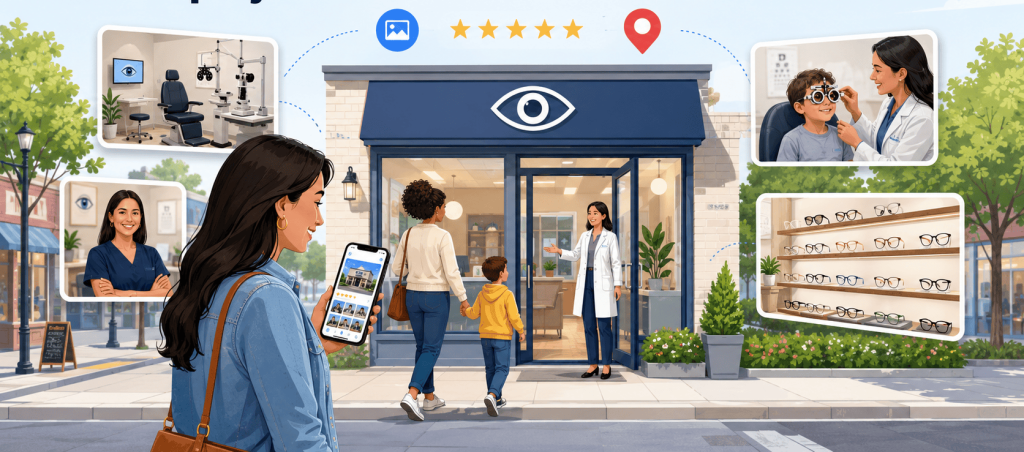
A prospective patient may see your clinic’s photos before they read a review, visit your website, or speak with your front desk. In a few seconds, those images begin answering questions: Is this the right building? Does the office look current? Who works here? Will I feel comfortable bringing my child or an older family member?
That is why Google Business Profile photos for eye clinics should be treated as more than decoration. The right images make an unfamiliar practice feel recognizable. They show patients what to expect and give them reasons to feel confident about taking the next step.
Google encourages businesses to add photos of their storefront, products, and services. It specifically notes that exterior photos can help visitors recognize a business when they arrive. Photos do not guarantee a better local ranking—Google says local results are mainly shaped by relevance, distance, and prominence—but they can make the profile more informative and useful to the people comparing nearby clinics.
Why photos shape trust before the appointment
Choosing an eye clinic is not quite like choosing a coffee shop. Patients may be thinking about blurred vision, a child’s first exam, a new diagnosis, an unfamiliar procedure, or the cost of eyewear. Even a routine appointment can come with uncertainty.
Photos can remove some of that uncertainty before the patient ever walks through the door.
A clear exterior image helps someone recognize the building. A bright reception photo suggests that the office is organized and cared for. Current team portraits introduce the people a patient may meet. Images of examination rooms and diagnostic equipment can signal capability, provided they are presented in a way that feels understandable rather than intimidating.
Together, these images create a preview of the visit.
They also help patients notice the differences between practices that may otherwise look similar in local search. Two clinics may have comparable ratings, services, and hours. The one with current, authentic photos can feel more familiar—and familiarity often makes the decision to call or book easier.
Local SEO resources consistently recommend a varied gallery that includes exterior, interior, team, product, and service imagery. The opportunity for an eye clinic is to take that general advice further by making every photo answer a genuine patient question.
What a trustworthy eye clinic gallery actually looks like
A trustworthy gallery does not have to resemble a glossy magazine shoot. In fact, photos can lose credibility when they feel too staged, heavily filtered, or disconnected from the real practice.
The strongest images usually share a few qualities.
They are authentic. Patients see the actual clinic—not a generic stock waiting room or a model wearing a white coat.
They are current. The people, décor, signs, equipment, and services shown in the gallery still exist.
They are clear. The lighting is comfortable, the framing feels intentional, and the main subject is easy to understand on a phone screen.
Most importantly, they are useful. They help someone locate the entrance, understand the environment, recognize a provider, or see a feature that matters to their care.
Consistency matters too. A clinic can create doubt when its Google profile shows one visual identity while its website shows another. Current branding, staff photos, and office imagery should feel connected across the patient’s online journey. That consistency can be strengthened through thoughtful eye care website design and profile management.
Google’s own guidance recommends high-quality media that reflects real places and experiences. Its policies also make businesses responsible for ensuring their submitted imagery follows applicable laws and regulations.
Show the details patients actually want to see
A strong Google Business Profile gallery should do more than make the clinic look polished. It should answer the practical questions patients have before they book or arrive.
1. Show the outside of the clinic clearly
Include a wide exterior photo, visible signage, and the correct entrance. When parking, elevator access, or suite location could be confusing, add a photo that gives patients more context.
These images may not be the most visually impressive in the gallery, but they are often the most useful.
2. Let patients see the reception area
A clear photo of the front desk helps patients understand what they will see when they walk in. Keep the space tidy, well lit, and true to the real clinic.
This is often where the first in-person impression happens, so the image should feel welcoming without looking overly staged.
3. Give an honest view of the waiting room
Show the seating, lighting, layout, and any features that may matter to patients, such as wheelchair access, children’s areas, or a calm environment.
The goal is not to make the room look larger than it is. It is to help patients feel more prepared for the visit.
4. Introduce the doctors and care team
Use current photos of the people patients may meet, including doctors, opticians, technicians, and front-desk staff.
Individual portraits help patients connect names with faces, while a relaxed team photo can make the practice feel more approachable.
5. Photograph exam rooms without making them feel intimidating
Clinical spaces should look clean, organized, and professional, but not cold or unfamiliar.
Use wider images that show the room in context rather than focusing only on equipment. A staff member in the scene can also make the space feel more human.
6. Show diagnostic equipment in a patient-friendly way
Modern technology can support credibility, but unexplained close-up photos of machines may create confusion.
Photograph equipment in the room where it is used, and consider including a team member beside it. This helps communicate capability without making the image feel overly technical.
7. Highlight the features that make the clinic different
Include the areas and services that matter most to your patients. This could be an optical dispensary, pediatric space, low-vision resources, specialty testing area, accessible entrance, or multilingual support signage.
These images help prospective patients see whether the practice can meet their specific needs.
The best photo mix quietly answers a few important questions: Can I find the clinic? Will I feel comfortable there? Who will care for me? Does the practice seem prepared for what I need?
Take an honest look at the photos already there
Before planning a new shoot, review what patients can see today.
Open the profile as a prospective patient would, preferably on a phone. Move through the gallery slowly. Do not just ask whether each photo is attractive. Ask whether it is still helping.
A useful image should be accurate, recognizable, relevant, clear, reassuring, and privacy-safe. When a photo falls short, decide whether it should be kept, retaken, replaced, or removed.
An exterior image from several years ago may still be sharp, but it becomes confusing if the clinic has changed signs. A polished team portrait loses value when half the people pictured no longer work at the practice. A photo of an old optical display may suggest that frames are still available when the inventory has completely changed.
Low-quality images deserve the same scrutiny. Dark examination rooms, crooked lobby photos, cluttered counters, blurry signs, and repetitive images can make a well-run practice appear neglected.
Stock photography is another common weak point. A generic image may be visually pleasing, but it does not help patients understand your location or experience. When the real office looks nothing like the profile, that disconnect can weaken trust.
This review can also support broader online reputation management for eye clinics. Photos, reviews, business information, and website content should tell a consistent story about the practice.
Plan the photo session around a real visit
A natural-looking gallery still requires planning.
Walk through the clinic in the same order a patient would. Begin at the street or parking lot, move toward the entrance, continue through reception and the waiting area, and then photograph the clinical and optical spaces.
That route creates a practical shot list without making the session feel mechanical.
Before taking photos, remove paperwork, shipping boxes, exposed cords, personal items, and anything else that distracts from the space. Straighten frame displays and check that signs are current. Clean glass surfaces and equipment, especially anything likely to catch reflections.
Let the clinic look polished, but still real. Patients do not expect a working practice to resemble an untouched showroom.
When photographing staff, aim for a mixture of composed and natural images. A formal provider portrait has a purpose. So does a warmer photo of a technician preparing an exam room or an optician helping a staff member try on frames.
Review each image at mobile size before uploading it. A photo that looks balanced on a large monitor may crop awkwardly in Google’s interface. It is also worth remembering that setting a preferred cover image does not guarantee Google will always display it first.
A coordinated photo library can support more than the Business Profile. The same session may produce useful assets for the clinic website, social channels, provider pages, and educational content. A focused content strategy for eye care practices helps those images work together rather than appearing as disconnected updates.
Keep privacy in the frame
Healthcare photography carries responsibilities that a restaurant or retail store does not face.
Before pressing the shutter, look beyond the main subject. Check monitors, patient schedules, charts, prescription labels, whiteboards, sign-in materials, reflections, and paperwork left on counters. Listen as well. Protected information may be visible, written, electronic, visual, or spoken.
HHS guidance explains that covered healthcare providers cannot give media access to areas where patients’ protected health information is accessible without first obtaining valid authorization from each affected patient. It also states that blurring a patient after filming is not a substitute for prior authorization. Even when authorization exists, reasonable safeguards are still required.
For a routine marketing shoot, the simplest approach is often to photograph when patients are not present and use team members or properly approved models for staged interactions.
Assign one person to perform a final privacy check before anything is uploaded. That second look can catch a name reflected in glass, an appointment visible on a monitor, or a document sitting quietly in the background.
Keep the gallery current without chasing a quota
There is no need to upload a new photo simply because another week has passed.
Refresh the gallery when something meaningful changes: a provider joins the practice, the signage is replaced, the waiting room is renovated, new equipment is introduced, or a specialty service is added. Event-based updates are more useful than filling the profile with repetitive images to meet an unsupported publishing schedule.
It is also important to review photos contributed by other Google users. Publicly submitted media may appear alongside owner-uploaded images. When a photo is inaccurate, irrelevant, inappropriate, or violates policy, Google provides a reporting process through Maps.
When evaluating results, look beyond rankings. Calls, website visits, direction requests, appointment inquiries, and patient feedback can all provide context. A new patient saying, “I recognized the entrance from the photo,” may be a small comment, but it shows that the gallery served a real purpose.
Avoid attributing every rise or decline to a particular upload. Local visibility can also change because of proximity, competition, reviews, categories, website updates, seasonal demand, and other factors. Google identifies relevance, distance, and prominence as the main foundations of local results.
A broader local SEO strategy for eye clinics should connect the gallery with accurate business information, a useful website, patient reviews, and location-focused content.
Make the profile feel like the practice
A trustworthy gallery does not need hundreds of photos. It needs the right ones.
Show patients where they are going. Introduce the people they may meet. Give them an honest view of the environment, equipment, and services. Remove anything outdated, confusing, or privacy-sensitive. Then revisit the gallery whenever the practice changes.
The goal is simple: the clinic a patient sees in local search should feel like the clinic they encounter when they arrive.
Visiclix helps eye care practices connect their local-search presence with the broader patient journey. To identify gaps across your Google Business Profile, website, reviews, and digital marketing, request a local visibility review.